Ditch the Projector: How to Outline Murals Using VR Technology
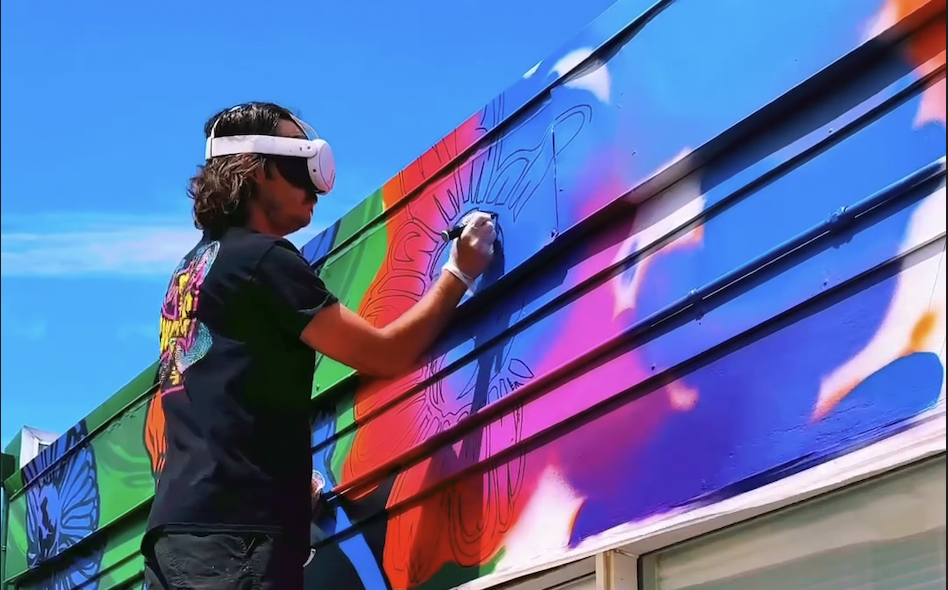
Traditional mural transfers often rely on grid systems or digital projectors, which require low light and power sources. A modern alternative involves using a VR headset, such as the Meta Quest, combined with an app like Sketch VR. By loading a transparent PNG of your design into the headset, you can utilize 'passthrough' or mixed reality mode to overlay your digital sketch directly onto the physical wall in real-time.
The Setup: VR Meets Street Art
Once your image is loaded, the workflow is surprisingly intuitive. You simply scale the digital projection to fit the wall's dimensions and adjust the angle until it sits perfectly flat against the surface. Once the position is locked in, you can grab your spray paint and trace the virtual lines. This method allows you to work in broad daylight, a significant advantage over projection methods.
The Process: Scale, Lock, and Trace
While the technology is impressive, it has quirks. The digital overlay can experience 'drift' if you move your head too fast, so smooth, steady movements are key. The most critical tip is to include specific 'registration marks' in your design. Paint these marks on the wall first. If the headset loses tracking or if you need to take a break, you can easily realign the digital overlay with these physical painted marks to ensure your layers match up perfectly.
Pro-Tips for Precision
Is it perfect? Not entirely—there is slight drifting, and it requires a steady hand. However, the results are 'pretty slick.' The ability to visualize the final piece in full scale before laying down paint makes this a powerful tool for any muralist's kit. It effectively bridges the gap between digital illustration and large-scale physical application.